
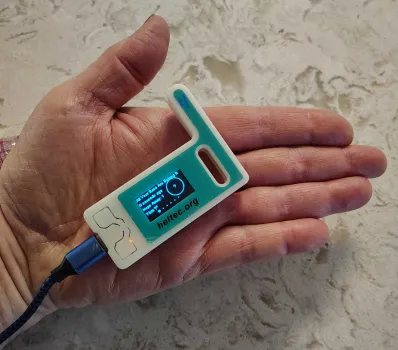
| This is my first node. I now recommend the one below which has a built-in battery and connector for a better antenna. |
A few months ago, the stake president asked me to look for a technology that would allow cell phones to communicate independently of the cellular network or the internet. He specifically wanted an ad-hoc system where phones could relay messages over long distances, even when they were out of range of one another.
I knew such technology existed, but most of what I found were instructions for building custom devices using microcontrollers like Raspberry Pis or Arduinos. Then, while researching something completely unrelated, I came across Meshtastic. It matched exactly what the stake president was looking for: inexpensive radio modules that connect to smartphones via Bluetooth.
As I tested Meshtastic, I learned about Meshcore, a newer system that many Meshtastic users are migrating to. After extensive testing of both technologies, I have decided to move forward with Meshcore for our emergency communication project.
You can learn more about how Meshcore works on the How It Works and Meshtastic vs. Meshcore pages.
We are currently moving forward with Meshcore in the San Diego East Stake, and we welcome anyone in the surrounding area to participate. There is already an active Meshcore community in Southern California, and we are coordinating closely with them. To ensure compatibility, our devices are configured to match the standards used by the West Coast Mesh community.
The West Coast Mesh community already operates many repeaters throughout Southern California. However, there are still large unserved areas, and many existing repeaters are experimental or operate only intermittently. To improve overall coverage, we are adding our own repeaters to the network to increase reliability and provide the redundancy needed for dependable communication.
If you would like to stay informed on developments with the broader Meshcore network in Southern California, you can join the West Coast Mesh community on Discord. Visit discord.com, create an account, and send a friend request to West Coast Mesh.
You can also follow the Meshcore channel on the San Diego Mesh server on Discord, which often shares updates relevant to the West Coast Mesh community. In addition, the SoCalMesh server on Discord provides another active space with overlapping information and discussions. Many users choose to join all three servers.
Finally, we have our own So Cal Stakes Emergency Response Mesh server on Discord. It's just getting started, but it is the best place to participate in two-way communication concerning our corner of the mesh.
We now have good coverage in most of Santee. West Santee could not reach the greater mesh but we now have two repeaters serving that area. One of those repeaters can reach the Mt. Helix repeater, which connects the valley to the greater mesh. Eastern Santee mostly has a line of sight to Mt. Helix.
I am building repeaters slated to be installed
near the cloud water tower near the 115 and Grossmont College Dr. This will
improve the connection out of the valley. I am building another repeater slated
for Fletcher hills west of Gillespie
Field. This repeater will back up Mt.
Helix to cover El Cajon and eastern Santee. I have the parts for a repeater
slated for the Santee Building.
Once Santee is fully covered I plan two repeaters on Del Cerro hill and one at the Zion Building. With these repeaters about 99 percent of the stake will be covered. Notably not covered will be the area around the Tierrasanta Building. I am still scouting a location for a repeater to cover that area.
TMI -- TLDR (but maybe look at the pictures)
10/11/2025 10:53pm -- Bob DuHamel here. I'm experimenting with a licence-free text-only radio communication system called LoRa. Particularly with an open system called Meshtastic. This is an existing system of radio stations that relay text messages over a long distance (LoRa for Long Range).
A transceiver costs about $35 with Battery backup and fits in the palm of your hand. Here's one of mine.
|
|
|
You connect to the radio via Bluetooth using the Meshtastic app on your phone. I successfully sent messages from the mission valley building to my home by the lakes.
To have reliable communication throughout the stake we will probably have to set up our own network. However using outdoor antennas I think one node like the above unit per ward should do it. Mine, sitting on the kitchen table, covers the Heaney circle area and a little bit to the west of the lakes. I managed to connect directly to my home unit in the kitchen all the way from West hills Park but that far away it was hit and miss.
Last night I got responses to test messages all the way from Ramona and Otay
mountain and brown field by the Mexican border.
If anybody wants to give
this a try you can buy the units on Amazon and if you want to play with them
yourselves you can get whatever unit you want. However I'm going to buy some
more and set them up and if anybody wants to buy one from me I will sell it to
you at my cost.
If you want to buy your own just search for Meshtastic on Amazon. I'm using the ESP32 V3, which is about $22 on Amazon and about $30 with a battery backup. However there are other units and they're all sorts of ways to play with it. I'm planning to buy one, put an outdoor antenna on it, battery powered with a solar recharger. And that will make me a permanent member of the public network.
If anyone wants to buy an ESP32 V3 themselves and doesn't want to try to set
it up themselves I will do it for you. I haven't tried anything else yet but I
can set up an ESP32 in a few minutes.
You have to install the free Meshtastic
firmware to get it up and running.
By the way, I'm offering to get anyone who wants to started with Meshtastic
on my own volition. This is not an official communication method at this time
(see status change below).
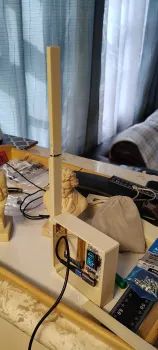
11/12/2015 10:08am -- I'm building a
Meshtastic node that will eventually become a solar-powered repeater. I'm
putting it in the attic for now for testing.
 |
|
|
 |
|
|
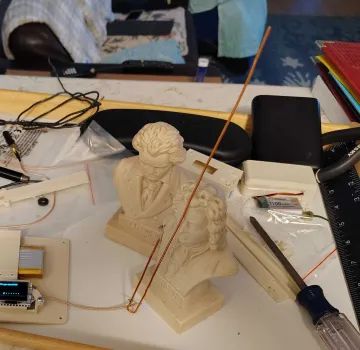
Randy Schimpf -- Does it work best when resting on Bach's
forehead? Beethoven doesn't look pleased at all.
Nathan Squire
-- Isn't human electrocution outlawed?
Bob DuHamel -- Well,
the j-pole being a classic antenna, I was using Beethoven to hold it up but
after dropping it I had to use a baroque composer.
Nathan Squire
-- (laughing emoji)
Randy Schimpf
-- Well done.
I'm on a local Meshtastic forum and I'm receiving multiple recommendations that we use Meshcore rather than Meshtastic for emergency communication. Meshcore uses the same hardware just different programming. I'm looking into it and we can decide what is better down the road.
 |
|
|
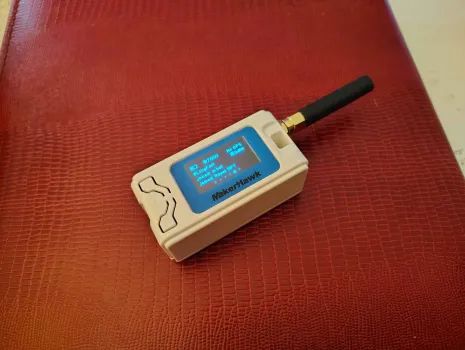
So, here's the Meshtastic node I'm recommending. It's the same hardware as in the previous picture, but comes with a built-in battery and an antenna connector so you can change the antenna. Anybody else who wants to join the Meshtastic game, and doesn't want to fiddle around getting a node to work just let me know and I'll get you one. They're $35 each, that's my cost. For another $3.75 (if you buy two) you can add a right angle antenna that makes it easier to keep the antenna vertical if you want to you could put it on a high shelf.
The way it works is, you just put this in a good place, the higher the better, connected to a USB power source and leave it (mine is currently in the attic but I plan to put it above the roof outside using solar power). If you don't want to participate in the idle chitchat you can just leave it there and help build the net. Otherwise you connect to it by Bluetooth and use it to read and send text messages. There's a public channel with people talking about the weather etc. And I've also set up a private channel just for the church.
Mark Jacobson -- Can it survive outdoors?
Bob
DuHamel -- As is, it is not weatherproof. But you can put it in a
weatherproof box that costs about $10. A solar panel cost about another $10.
You can connect through Wi-Fi, but if the power goes out so does the Wi-Fi which defeats the idea of using it when everything goes south. The only caveat there is that you have to be fairly close to connect your Bluetooth to it. So you don't want it too high outside.
Eben Maat, Derek Duchein, Craig Wilken and Dave Papworth all have nodes, but the only ones I can see from my place are Eben's. I'm figuring out who to recruit to help fill in the dead zones to make it so everybody can see everybody else. I'm planning to get real friendly with Don Harrison Sunday and ask him to run a node which should fill the gap between me and the Ducheins.I'm giving Randy Cooper a node tomorrow. Randy, I'll have that all set up and ready to go by church tomorrow so I'll give it to you then.
11/18/2025 9:19pm -- So, here is what I've learned about Meshcore so far. I programmed two nodes and set up one with a good antenna in a decent position on my kitchen counter where I tested my Meshtastic node. Over a few hours it started listing personal nodes and repeaters as they announced themselves and I saw some talk on the public channel.
Then overnight, everything went dead because the weather took out some repeaters. However Meshtastic was still up and running because it's more established with more nodes out there and everything looks normal.
So Meshcore at this time is just getting started, and is vulnerable because there's not enough redundancy.
So, either way we will need to build our own network with our own repeaters, so we won't be depending on people outside our control to maintain the network.
However, unlike Meshtastic, Meshcore is not subject to degradation if you have too many repeaters.
I have made some connections in the Meshtastic / Meshcore community and they are interested in donating repeaters if we can provide good locations for them. So we don't have to be entirely isolated in our endeavor.
By the way, there is significant overlap in the mesh community and the amature radio community. The guy who maintains the "All Your Base" repeater network (Meshtastic and Meshcore) is the VP of the San Diego Repeater Association.
11/20/2025 4:22pm -- Mesh update: apparently Santee suddenly becoming a dead zone was not due to the helix repeater going down. Helix is back up and if I stand in my front yard and hold my companion node high above my head I can hit it. I was apparently getting coverage via the Cowles Mountain repeater which is currently dead due to water intrusion and being rebuilt.
12/21/2025 9:00am -- Here are my current plans. I'm going to continue working with both Meshtastic and Meshcore. It's sort of like working to ham bands; different people and different coverage. And why not, it's cheap. I'm still not sure which technology is best for our purposes so I'm still experimenting.
Meshcore requires dedicated repeaters but the repeater on Mount Helix already
covers 90 to 95% of the stake. Repeaters at the Maats and Harrisons would fill
in the gaps in the Santee area. Four more repeaters, at some active members
houses that I have already located, would fill in the other gaps, giving us
about 99% coverage, and giving us pretty much full redundancy in case both Helix
and Cowles go down. However, regular units (clients) using Meshtastic may give
us the same coverage using the same locations without dedicated repeaters (the
repeaters on Helix and Cowles are Meshcore only). So I'm still experimenting.
11/23/2025 8:05pm -- I have finished my experimenting with Meshtastic.
The routing algorithm using only client nodes is not very reliable. Watching the
public channel I see a lot of answers to messages I did not receive. Even though
there are client nodes scattered around Santee, I can't get messages from one
end to the other, or even either end to the middle, etc.
I put a client node in the library box in front of the Harrison's. I could "see" that node from my house and from the Duchene's, but I couldn't get a message to relay through it. Then I reconfigured a node in the library as a router (repeater) and I could reliably communicate between my house and the Duchene's. But I still couldn't reach the east end of Santee. So I put another router in a library box high on Atlas view Street after which I could communicate from one end of Santee to the other.
The repeater at the Maat's house helped in that communication and in the end would be important in getting communication out of Santee.
The bottom line is that Meshtastic is only reliable with strategically located, dedicated repeaters. Since Meshtastic repeaters simply flood out everything they hear, adding repeaters to Meshtastic can cause saturation, resulting in whole areas losing communication. Meshcore requires dedicated repeaters from the outset, but the repeater algorithm only floods out messages the first time a client node announces itself. Redundant repeaters drop out once a route is determined. If a repeater goes down, they will flood messages again to determine a new route. Meshtastic theoretically can create an ad hoc network without repeaters but that simply does not work reliably.
The other bottom line is that this is all volunteer, you can participate or not, and how you participate is up to you. As I said before I'm going to work both Meshtastic and Meshcore because they are two different (but overlapping) communities. However I'm going to concentrate on Meshcore.
As always, anybody who wants to jump on the bandwagon, just tell me and I can get you ready to go nodes at my cost or tell you what you need to know to get a node on either mesh setup.
And Eben, Your place is one of the three places I have determined would be a good place for a Meshcore router. Let me know if you want to participate and I will tell you what you need to know to set it up for the local mesh.
By the way, the Meshcore app has a really, really good mapping tool to determine line of sight for antenna replacement.
For anybody who wants to set up a node for Meshcore, to participate in the local community, which has a number of repeaters already in place, and a community of people to talk to, the radio configuration is:
Frequency: 927.875 MHz
Bandwidth is 62.5 kHz
Spreading Factor: 7
Code rate: 5
(The spreading factor was changed from 9 to 7 on December 12th 2025)
I will reconfigure to be compliant with the local community.
For those who are interested, there is an active Discord server called San Diego Mesh. Good information and advice available there for both Meshtastic and Meshcore.
12/1/2025 7:55 pm -- I put a test Meshcore repeater on a tree stump at Eben's house. Just a regular node programmed as a repeater. No fancy antenna or anything. Then I went to my house by the lakes and sent a test broadcast asking for acknowledgment from anyone who heard it. I got an acknowledgment but I can't determine exactly where because the user is not registered in my unit yet. However, the second repeater that message hit was on a jetty off Port Hueneme. Then it hit Mount Wilson, then Mount Helix, then my test repeater and then got to my home node.
Amazing how far the messages can go between repeaters considering they transmit with less than one watt. Mike Smith also has a test repeater at his house by the cloud Tower. I haven't yet been able to determine if his repeater can hit any other repeaters.
 |
|
|
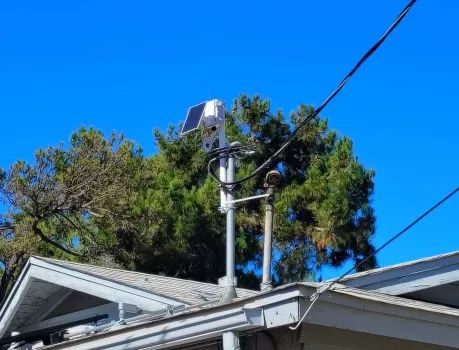
12/5/2025 11:34am -- I finally got my solar node on the roof. You can't see the antenna, it's a tiny copper wire formed into a j-pole. The total cost for such a repeater (LoRa node, 3000mAH battery, box and Solar panel) is about $65.00.
12/6/2025 1:22pm -- Here are some other discords related to meshes in Southern California:
12/10/25, 7:05 AM Configuration Change
On Friday December 12th 2025 at 8:00 p.m., the local mesh is going to begin transitioning to a new configuration. This transition is scheduled to be complete by 8:00 p.m. on Monday December 15th. The new configuration will switch from a spreading factor of 9 to a spreading factor of 7. The following will be the new LoRa radio settings:
Frequency: 127.875
Bandwidth: 62.5
Spreading factor: 7
Coding rate:
5
I will reconfigure the repeaters remotely so don't worry about them. However you will have to reconfigure your companions. To do this:
Over the weekend, during the testing phase, communication maybe unreliable as some repeaters change before others. But everything should be back to normal Monday at 8:00 pm.


