| Operating and planned repeaters |
|
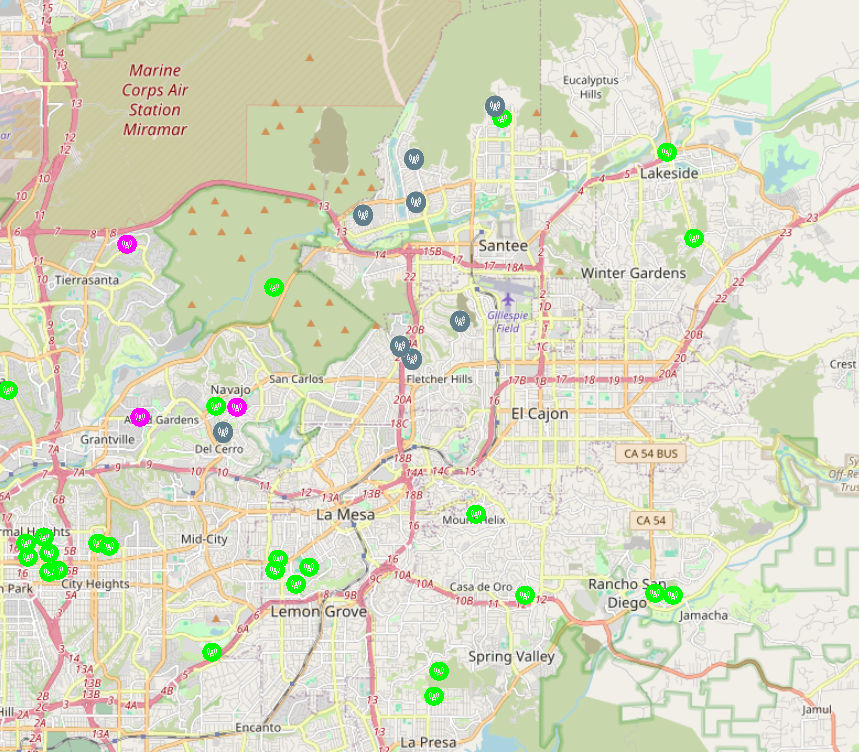
Gray: Currently operating stake repeaters Magenta: Planned stake repeaters Green: Existing community repeaters |
A repeater on Mt. Helix covers about 80% of the stake. The Mt. Helix repeater is in place with the permission of the organization in control of the venue and is maintained by an active mesh enthusiast. However, if it fails we will lose most of our connectivity. We need our own repeaters to back up Mt. Helix and to fill the uncovered zones. Here are the current operating and planned repeaters.
|
|
||
|
These repeaters will cover or provide redundancy to 90 to 95 percent of San Diego East Stake and beyond.
We also may locate several more repeaters for redundancy.
I am attempting to establish liaison with other stakes to expand the mesh.
A few months ago, the stake president asked me to look for a technology that would allow cell phones to communicate independently of the cellular network or the internet. He specifically wanted an ad hoc system where phones could relay messages over long distances, even when endpoints were out of range of one another.
I knew such technology existed, called LoRa, but most of what I found were instructions for building custom devices using microcontrollers like Raspberry Pis or Arduinos. Then, while researching something completely unrelated, I came across Meshtastic. It matched exactly what the stake president was looking for using inexpensive radio modules that connect to smartphones via Bluetooth.
As I tested Meshtastic, I learned about Meshcore, a newer system that many Meshtastic users are migrating to. After extensive testing of both technologies, I have decided to move forward with Meshcore in the San Diego East Stake. We welcome anyone in the surrounding stakes to participate in our emergency communication project.
You can learn more about how Meshcore works on the How It Works and Meshtastic vs. Meshcore pages.
We are cooperating with the West Coast Mesh community, a loosely organized group of Meshcore enthusiasts that has already built a large network of more than 400 repeaters across Southern California. Their system provides impressive regional coverage, stretching from Ventura County to the Mexican border and across the Inland Empire and beyond.
Community repeaters
The repeaters maintained by volunteers cooperating with West Coast Mesh are too numerous—and their status too fluid—to list comprehensively. However, several notable units within the stake include repeaters on the summit of Mt. Helix, the north slope of Mt. Helix, just east and west of Helix High School, northeast of Rolando Park, at Euclid and Monroe Avenues, northwest of Hoover High School, and in Mission Trails Park. Outside the stake, major repeaters on Otay Mountain and Palomar Mountain also provide partial coverage.
Despite this extensive network, many locations remain unserved or unreliable. Some repeaters are experimental, temporary, or installed in unsecured locations. Even the most dependable units can fail. For example, the Cowles Mountain repeater suffered water ingress in January and will not be replaced, leaving much of Santee without coverage.
To ensure reliable emergency communication within the San Diego East Stake, we are establishing our own stake‑controlled repeaters to provide stable, predictable coverage independent of the broader community network.
This section is a bit redundant. I will merge it with the repeater status section above soon.
As the network now stands, if you can reach the repeater on Mt. Helix, you can send messages anywhere covered by the greater community mesh. The Mt. Helix repeater already covers much of the stake.
Escape from Santee
Western Santee is below the plateau that makes up the Grossmont area and Fletcher Hills. This plateau blocks western Santee from Mt. Helix. Our first objective was to establish connectivity in western Santee. This objective has been reached. We now have stake-operated repeaters at the following locations (since this webpage is public, the exact locations are obscured to preserve the privacy of the repeater hosts):
These connect Santee to the existing Mt. Helix repeater, which covers roughly 60-70% of the remaining stake. Existing repeaters maintained by other West Coast Mesh volunteers fill portions of the remaining area.
Ensuring coverage in Santee
Santee is entirely dependent on the Mt. Helix repeater to connect to the greater mesh. We are installing repeaters at member’s homes near the Grossmont Building to provide an alternate path out of Santee if the Mt. Helix repeater goes offline.
Del Cerro and La Mesa
Church members on the north and south sides of Del Cerro Hill have volunteered to host repeaters that will back up the Mt. Helix coverage in Del Cerro, San Carlos and La Mesa.
Allied Gardens and Grantville
A repeater is also planned near the Stake Center to serve western Allied Gardens, and Grantville.
Tierrasanta
The area around the Tierrasanta Building is not served by any repeater and finding a location for a repeater to cover this area is proving difficult.
College area, Mid-City, Rolando, City Heights, Oak Park
There are no high points that are obvious locations for repeaters in this area. This region may be covered by the repeater slated for the south side of Del Cerro Hill. Otherwise, I will have to evaluate the coverage and place repeaters as needed.
Cowles Mountain Ward, City Heights Branch
These units cover wide areas that extend well outside the stake boundaries. We will depend on the participation of other stakes to provide full coverage to these units.
It is impossible to guarantee mesh coverage inside every home. Conditions vary widely. For example, one participant can reach the repeater near Mast Boulevard and Carlton Hills Boulevard from anywhere inside his house. However, another participant can only reach the West Hills High School repeater from a single window. Many people in situations like this are installing personal repeaters to ensure they can connect reliably.
There are two general styles of personal repeater:
Unfortunately, none of the church buildings in the stake are good locations for repeaters. Howeve, repeaters on church buildings will ensure connectivity from inside the buildings. "Personal" repeaters are slated for each church building.
If you would like to stay informed on developments with the broader Meshcore network in Southern California, you can join the West Coast Mesh community on Discord. Visit discord.com, create an account, and send a friend request to West Coast Mesh.
You can also follow the Meshcore channel on the San Diego Mesh server on Discord (San Diego Mesh is mostly focused on Meshtastic but there is some discussion about Meshcore), which often shares updates relevant to the West Coast Mesh community.
Finally, we have our own So Cal Stakes Emergency Response Mesh server on Discord. It's just getting started, but will be a place to participate in two-way communication concerning our corner of the mesh.
Why don't we use (fill in the blank)?
Meshcore is inexpensive, requires no license, already has an active user community, and benefits from hundreds of existing repeaters. Being a text-based system, messages are clear and are relayed to the intended recipient immediately and automatically. Meshcore is not handicapped by only one operator being able to talk at one time, repeating unclear transmissions or manually relaying messages via several operators to the intended recipient.
Meshcore could theoretically become congested during a major emergency, but if that happens we can shift to an unused frequency as part of a coordinated plan.
Why don’t we just use text messaging on our phones? Text messages often get through when voice calls don’t.
When the cellular system becomes congested, text messages may still go through, but they can take hours or fail entirely. In a large‑scale emergency, the delays make texting unreliable for real‑time coordination.
Why don't we stick with amateur radio?
Maintaining an active community of amateur radio operators has become increasingly difficult. Interest has declined significantly, and without regular participation the system cannot be relied on during an emergency.
Why don't we use GMRS radio?
Some stakes are using GMRS as their primary emergency communication system. However, we have found the licensing requirement to be a significant barrier to participation, even though no test is required to obtain a license. Those who own GRMS equipment can be pressed into service during an emergency, but we have decided that LoRa, particularly Meshcore, is a better fit for our primary method of emergency communication.
Why don’t we operate GMRS under a single church‑owned license?
The church prefers emergency communication systems that are autonomous and community‑driven. In addition, FCC rules do not allow GMRS to be operated under an umbrella organizational license. Each family must hold its own license.
It’s legal to use amateur radio or GMRS without a license in a bona fide emergency. Why not keep those radios on the shelf and only use them when needed?
It is legal to use those services without a license during a true emergency. However, equipment that sits unused is unlikely to work when the moment comes. Systems must be used and tested regularly, just as we do with our weekly amateur radio net, to ensure they are functional and familiar.
Why don’t we use satellite phones?
Satellite phones are expensive and impractical to purchase solely for emergencies. Starlink’s emerging “Direct to Phone” service is promising, but only certain phones and plans support it. Regular testing is difficult because the feature activates only when you are completely outside cellular coverage. Starlink Direct to Phone may become a valuable tool, but we still need a primary plan that works regardless of whether Starlink is available.
Why don’t we use Starlink?
Purchasing Starlink equipment strictly for emergency use is not practical. However, if enough people already own Starlink at home, it may become one of several tools we can draw upon during an emergency.
TMI -- TLDR (but maybe look at the pictures)
10/11/2025 10:53pm -- Bob DuHamel here. I'm experimenting with a licence-free text-only radio communication system called LoRa. Particularly with an open system called Meshtastic. This is an existing system of radio stations that relay text messages over a long distance (LoRa for Long Range).
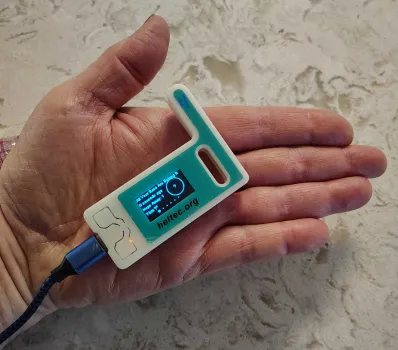
A transceiver costs about $35 with Battery backup and fits in the palm of your hand. Here's one of mine.
 |
|
|
You connect to the radio via Bluetooth using the Meshtastic app on your phone. I successfully sent messages from the mission valley building to my home by the lakes.
To have reliable communication throughout the stake we will probably have to set up our own network. However using outdoor antennas I think one node like the above unit per ward should do it. Mine, sitting on the kitchen table, covers the Heaney circle area and a little bit to the west of the lakes. I managed to connect directly to my home unit in the kitchen all the way from West hills Park but that far away it was hit and miss.
Last night I got responses to test messages all the way from Ramona and Otay
mountain and brown field by the Mexican border.
If anybody wants to give
this a try you can buy the units on Amazon and if you want to play with them
yourselves you can get whatever unit you want. However I'm going to buy some
more and set them up and if anybody wants to buy one from me I will sell it to
you at my cost.
If you want to buy your own just search for Meshtastic on Amazon. I'm using the ESP32 V3, which is about $22 on Amazon and about $30 with a battery backup. However there are other units and they're all sorts of ways to play with it. I'm planning to buy one, put an outdoor antenna on it, battery powered with a solar recharger. And that will make me a permanent member of the public network.
If anyone wants to buy an ESP32 V3 themselves and doesn't want to try to set
it up themselves I will do it for you. I haven't tried anything else yet but I
can set up an ESP32 in a few minutes.
You have to install the free Meshtastic
firmware to get it up and running.
By the way, I'm offering to get anyone who wants to started with Meshtastic
on my own volition. This is not an official communication method at this time
(see status change below).
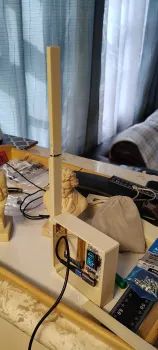
11/12/2015 10:08am -- I'm building a
Meshtastic node that will eventually become a solar-powered repeater. I'm
putting it in the attic for now for testing.
 |
|
|
 |
|
|
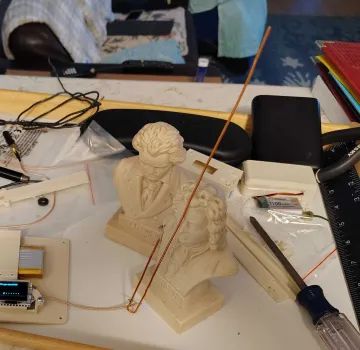
Randy Schimpf -- Does it work best when resting on Bach's
forehead? Beethoven doesn't look pleased at all.
Nathan Squire
-- Isn't human electrocution outlawed?
Bob DuHamel -- Well,
the j-pole being a classic antenna, I was using Beethoven to hold it up but
after dropping it I had to use a baroque composer.
Nathan Squire
-- (laughing emoji)
Randy Schimpf
-- Well done.
I'm on a local Meshtastic forum and I'm receiving multiple recommendations that we use Meshcore rather than Meshtastic for emergency communication. Meshcore uses the same hardware just different programming. I'm looking into it and we can decide what is better down the road.
 |
|
|
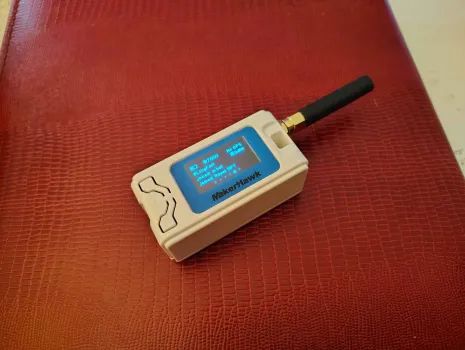
So, here's the Meshtastic node I'm recommending. It's the same hardware as in the previous picture, but comes with a built-in battery and an antenna connector so you can change the antenna. Anybody else who wants to join the Meshtastic game, and doesn't want to fiddle around getting a node to work just let me know and I'll get you one. They're $35 each, that's my cost. For another $3.75 (if you buy two) you can add a right angle antenna that makes it easier to keep the antenna vertical if you want to you could put it on a high shelf.
The way it works is, you just put this in a good place, the higher the better, connected to a USB power source and leave it (mine is currently in the attic but I plan to put it above the roof outside using solar power). If you don't want to participate in the idle chitchat you can just leave it there and help build the net. Otherwise you connect to it by Bluetooth and use it to read and send text messages. There's a public channel with people talking about the weather etc. And I've also set up a private channel just for the church.
Mark Jacobson -- Can it survive outdoors?
Bob
DuHamel -- As is, it is not weatherproof. But you can put it in a
weatherproof box that costs about $10. A solar panel cost about another $10.
You can connect through Wi-Fi, but if the power goes out so does the Wi-Fi which defeats the idea of using it when everything goes south. The only caveat there is that you have to be fairly close to connect your Bluetooth to it. So you don't want it too high outside.
Eben Maat, Derek Duchein, Craig Wilken and Dave Papworth all have nodes, but the only ones I can see from my place are Eben's. I'm figuring out who to recruit to help fill in the dead zones to make it so everybody can see everybody else. I'm planning to get real friendly with Don Harrison Sunday and ask him to run a node which should fill the gap between me and the Ducheins.I'm giving Randy Cooper a node tomorrow. Randy, I'll have that all set up and ready to go by church tomorrow so I'll give it to you then.
11/18/2025 9:19pm -- So, here is what I've learned about Meshcore so far. I programmed two nodes and set up one with a good antenna in a decent position on my kitchen counter where I tested my Meshtastic node. Over a few hours it started listing personal nodes and repeaters as they announced themselves and I saw some talk on the public channel.
Then overnight, everything went dead because the weather took out some repeaters. However Meshtastic was still up and running because it's more established with more nodes out there and everything looks normal.
So Meshcore at this time is just getting started, and is vulnerable because there's not enough redundancy.
So, either way we will need to build our own network with our own repeaters, so we won't be depending on people outside our control to maintain the network.
However, unlike Meshtastic, Meshcore is not subject to degradation if you have too many repeaters.
I have made some connections in the Meshtastic / Meshcore community and they are interested in donating repeaters if we can provide good locations for them. So we don't have to be entirely isolated in our endeavor.
By the way, there is significant overlap in the mesh community and the amature radio community. The guy who maintains the "All Your Base" repeater network (Meshtastic and Meshcore) is the VP of the San Diego Repeater Association.
11/20/2025 4:22pm -- Mesh update: apparently Santee suddenly becoming a dead zone was not due to the helix repeater going down. Helix is back up and if I stand in my front yard and hold my companion node high above my head I can hit it. I was apparently getting coverage via the Cowles Mountain repeater which is currently dead due to water intrusion and being rebuilt.
12/21/2025 9:00am -- Here are my current plans. I'm going to continue working with both Meshtastic and Meshcore. It's sort of like working to ham bands; different people and different coverage. And why not, it's cheap. I'm still not sure which technology is best for our purposes so I'm still experimenting.
Meshcore requires dedicated repeaters but the repeater on Mount Helix already
covers 90 to 95% of the stake. Repeaters at the Maats and Harrisons would fill
in the gaps in the Santee area. Four more repeaters, at some active members
houses that I have already located, would fill in the other gaps, giving us
about 99% coverage, and giving us pretty much full redundancy in case both Helix
and Cowles go down. However, regular units (clients) using Meshtastic may give
us the same coverage using the same locations without dedicated repeaters (the
repeaters on Helix and Cowles are Meshcore only). So I'm still experimenting.
11/23/2025 8:05pm -- I have finished my experimenting with Meshtastic.
The routing algorithm using only client nodes is not very reliable. Watching the
public channel I see a lot of answers to messages I did not receive. Even though
there are client nodes scattered around Santee, I can't get messages from one
end to the other, or even either end to the middle, etc.
I put a client node in the library box in front of the Harrison's. I could "see" that node from my house and from the Duchene's, but I couldn't get a message to relay through it. Then I reconfigured a node in the library as a router (repeater) and I could reliably communicate between my house and the Duchene's. But I still couldn't reach the east end of Santee. So I put another router in a library box high on Atlas view Street after which I could communicate from one end of Santee to the other.
The repeater at the Maat's house helped in that communication and in the end would be important in getting communication out of Santee.
The bottom line is that Meshtastic is only reliable with strategically located, dedicated repeaters. Since Meshtastic repeaters simply flood out everything they hear, adding repeaters to Meshtastic can cause saturation, resulting in whole areas losing communication. Meshcore requires dedicated repeaters from the outset, but the repeater algorithm only floods out messages the first time a client node announces itself. Redundant repeaters drop out once a route is determined. If a repeater goes down, they will flood messages again to determine a new route. Meshtastic theoretically can create an ad hoc network without repeaters but that simply does not work reliably.
The other bottom line is that this is all volunteer, you can participate or not, and how you participate is up to you. As I said before I'm going to work both Meshtastic and Meshcore because they are two different (but overlapping) communities. However I'm going to concentrate on Meshcore.
As always, anybody who wants to jump on the bandwagon, just tell me and I can get you ready to go nodes at my cost or tell you what you need to know to get a node on either mesh setup.
And Eben, Your place is one of the three places I have determined would be a good place for a Meshcore router. Let me know if you want to participate and I will tell you what you need to know to set it up for the local mesh.
By the way, the Meshcore app has a really, really good mapping tool to determine line of sight for antenna replacement.
For anybody who wants to set up a node for Meshcore, to participate in the local community, which has a number of repeaters already in place, and a community of people to talk to, the radio configuration is:
Frequency: 927.875 MHz
Bandwidth is 62.5 kHz
Spreading Factor: 7
Code rate: 5
(The spreading factor was changed from 9 to 7 on December 12th 2025)
I will reconfigure to be compliant with the local community.
For those who are interested, there is an active Discord server called San Diego Mesh. Good information and advice available there for both Meshtastic and Meshcore.
12/1/2025 7:55 pm -- I put a test Meshcore repeater on a tree stump at Eben's house. Just a regular node programmed as a repeater. No fancy antenna or anything. Then I went to my house by the lakes and sent a test broadcast asking for acknowledgment from anyone who heard it. I got an acknowledgment but I can't determine exactly where because the user is not registered in my unit yet. However, the second repeater that message hit was on a jetty off Port Hueneme. Then it hit Mount Wilson, then Mount Helix, then my test repeater and then got to my home node.
Amazing how far the messages can go between repeaters considering they transmit with less than one watt. Mike Smith also has a test repeater at his house by the cloud Tower. I haven't yet been able to determine if his repeater can hit any other repeaters.
 |
|
|
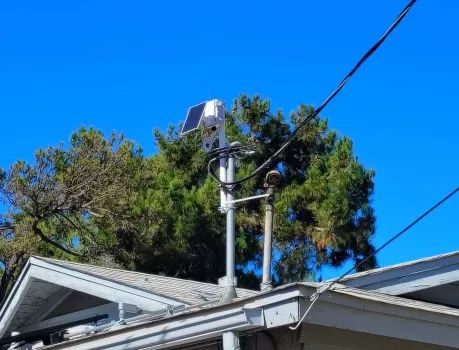
12/5/2025 11:34am -- I finally got my solar node on the roof. You can't see the antenna, it's a tiny copper wire formed into a j-pole. The total cost for such a repeater (LoRa node, 3000mAH battery, box and Solar panel) is about $65.00.
12/6/2025 1:22pm -- Here are some other discords related to meshes in Southern California:
12/10/25, 7:05 AM Configuration Change
On Friday December 12th 2025 at 8:00 p.m., the local mesh is going to begin transitioning to a new configuration. This transition is scheduled to be complete by 8:00 p.m. on Monday December 15th. The new configuration will switch from a spreading factor of 9 to a spreading factor of 7. The following will be the new LoRa radio settings:
Frequency: 927.875
Bandwidth: 62.5
Spreading factor: 7
Coding rate:
5
I will reconfigure the repeaters remotely so don't worry about them. However you will have to reconfigure your companions. To do this:
Over the weekend, during the testing phase, communication maybe unreliable as some repeaters change before others. But everything should be back to normal Monday at 8:00 pm.
Update: we have more than 20 people involved in the stake emergency communications mesh so I have to break up these messages (text messages on cell phones) into groups. A big thank you to those of you hosting repeaters. We now have rooftop solar repeaters at the Harrison's (West Santee), the Milnes (Carlton Hills), the Hooker's (Fletcher Hills) and the Wilcken's (East Santee). The repeater at the Wilcken's was slated for the Santee Building, but the Wilcken's is a better location. Communication is becoming more and more reliable in Santee. I can now get messages from one end to the other with only occasional failures. Three of these repeaters create good links with the greater community repeater on Mt. Helix. That connects us to the greater mesh covering from Ventura County to the Mexican border. Mike Smith is next in line for a repeater and I apologize that I still don't have one ready. I should have one ready this week. Mike's current repeater is experimental and not well connected, but very handy for testing purposes. Thanks Mike for keeping that going. I will send a message on how to test your units and get them communicating shortly. Full instructions are at SoCalStakesMesh.net
Here is how to get your unit going assuming your companion unit already
programmed. These instructions are a quick overview. More details are at
SoCalStakesMesh.net.
To test your unit and get connected: first,
download and install the Meshcore app. Second, connect the Meshcore app to your
Meshcore companion device via Bluetooth. If I programmed your unit the passcode
should be 123456. Otherwise the passcode should show on the companion unit
screen. This should be straightforward, but of course, Bluetooth can be a little
temperamental. You may have to connect via your phone setup for the first time
then you should be able to connect through the Meshcore app.
Once you are
connected to your companion device via Bluetooth, send an advert. Do this by
pressing the third button from the right in the top right corner of the app. An
advert tells all other devices on the net that you are up and running.
To
send a message go to the channels and choose a channel. Those I have programmed
should have the public channel and the SDES channel for the San Diego East
Stake. You can see messages on those channels or send your own by typing a
message and pressing the paper airplane button.
If you want to test your
connection to the mesh, you can add the #test channel. Do this in the
add-channel function of the app. You don't need to be invited to any channel
that begins with a #. Just specify #test as your channel and add it. You will
see people sending test messages on that channel.
To send your own test
message just go to the message box and type the word "test" or just the letter
T. With any luck, in a moment you should see a response from the meshbud robot.
This is a computer in Pasadena that monitors the mesh. The numbers that meshbud
returns to you are the identifiers for the repeaters you went through to get to
Pasadena. If you long press that returned message you will get some options that
include the path which is the repeaters that message took to get to you. Other
channels that can reach mesh bud are #meshbud and #bot. They all seem to work
about the same.
If you have a working companion unit you can help me by
keeping it plugged in to a USB charger and somewhere where it has a good view
where it might see a repeater. If you see Mt. helix, you should be able to
communicate just about anywhere in Southern California. Send an advert
occasionally so that your unit will show up in my contact list. Then I can send
test messages to your unit to see if I can connect. Your unit will respond
automatically you don't need to monitor it.
Go to SoCalStakesMesh.net
for help. I plan to have a get together either in person or on zoom or something
soon to help us all get communicating with each other.
Breaking news! The latest version of the Meshcore firmware (1.14.1) supports two byte identifiers. This enables 65,534 unique repeater identifiers instead of the current 254. This appears to only immediately affect those of us running repeaters. The plan is to upgrade all repeaters ASAP, but hold off on companion units until the whole repeater network is upgraded. However, the powers that be also recommend upgrading companion units to version 1.14.1 sooner rather than later. We will get the word to switch the companion units to two byte identifiers in six to eight weeks. I plan to organize a seminar for everyone who needs help programming or upgrading, and using the app soon.
Update: not much new to report this week. The updating of repeaters in Southern California appears to be going slowly, but is in progress. Many of the important repeaters are in remote locations so the owners have to hike in to update them. Also, repeaters are owned by people with varying levels of interest, so some may take a long time to be updated. All of the San Diego East Stake repeaters are updated. Once the majority are updated, the SoCal Mesh cat herders will give the go-ahead to update the companion units to match. I'm hoping to hold a seminar at that time to get everyone together to update their software and learn how to use the app. In the meantime, while repeaters are being updated, the mesh will continue to operate normally.
A lot of people installing personal solar rooftop repeaters. The problem: even if you can hit a repeater outdoors or on an upper floor, etc., you might not be able to hit a repeater from inside your house, especially on a lower floor. My goal is to have enough repeaters around the stake such that virtually everyone is covered and can connect to the SoCal Mesh, but you still may need to go outdoors or to an upper floor or specific window. Many people are putting up personal rooftop solar repeaters so they can use their companion units anywhere inside their houses. I don't need one because I can hit the repeater at Ken Milne's from anywhere in my house, but Derek Duchein needs his companion unit in the right window to hit the repeater at Don Harrison's. The repeaters I'm building for the stake only cost about $75, but they are labor intensive to build (for example, I custom make the antennas which are quite fiddly to tune properly, but far outperform any of the commercially made ones I can find). I found a generic LoRa solar repeater at Walmart for only $96 after tax. It uses the same electronics as our companion units, and I use companion units programmed as repeaters for testing all the time. They work just fine. If you just need a rooftop repeater to hit the next nearest area repeater, their 1/4 watt of power is plenty (I'm using units that have a full watt of power for the stake repeaters). And personal repeaters are just regular repeaters; they're personal in name only. Your personal repeater may be the critical connection for someone else. So, if you need a personal repeater, or just want to do your part to expand the mesh, here's the link to buy them. (no longer available) . Here’s another one with a self-contained solar panel. Again, using The same electronics as the companion units: https://www.walmart.com/ip/D5-Meshtastic-Mesh-LoRa-Node-Repeater-5W-Solar-Power-Kit-3-7v-Output-Heltec-ESP32-V3-Lora-Moudule-IoT-Device-915MHz/19629404633?sid=0e49b44f-c901-43ea-8e28-97b257cc277c . If you get one and need help programming it I am here to help.
4/19/2026
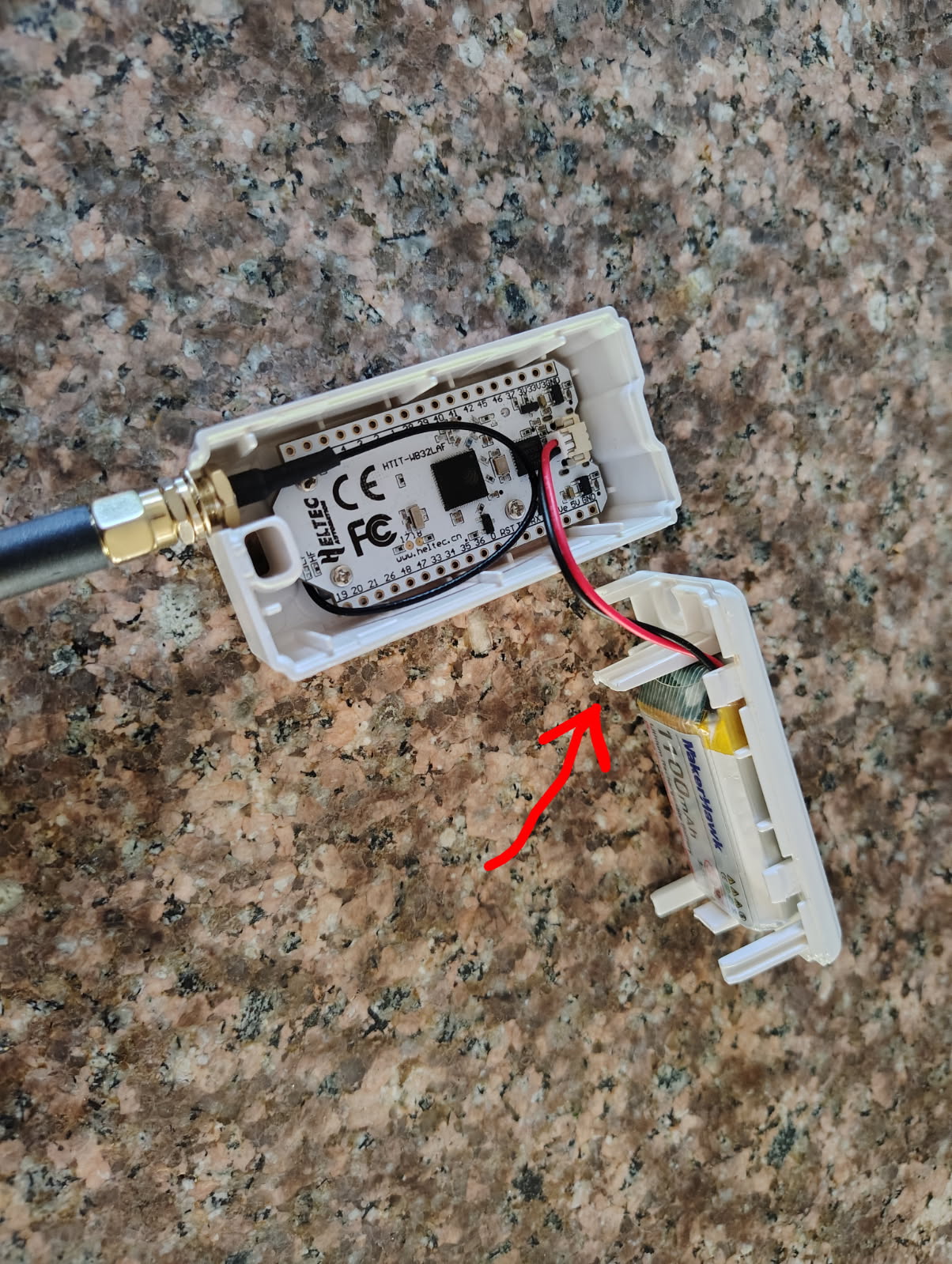
Update: I have had four reports of the mesh core companion units getting stuck in a boot loop (displaying "Loading" over and over and never starting up). Actually, two cases are mine, the other two are from someone else. In the case of my two units that did this, they worked fine if I took them out of their enclosures but then got stuck in the boot loop again if I put them in the enclosures. It appears that the enclosure is putting stress on the circuit board and eventually the heat and bending combine to cause either microfractures or flaky solder joints on the board. In my case I fixed it by shaving about a 16th of an inch off the tab shown in the following picture.
 |
|
|
I'm making standard procedure procedure shorten this tab you could call me proactively to prevent this problem in the future. Be careful opening the case. You will have to use a sharp paring knife to get into the seam to pry it open. I used the diagonal cutters to cut off between a 32nd and a 16th of an inch but you could use toenail clippers or something like that.


